

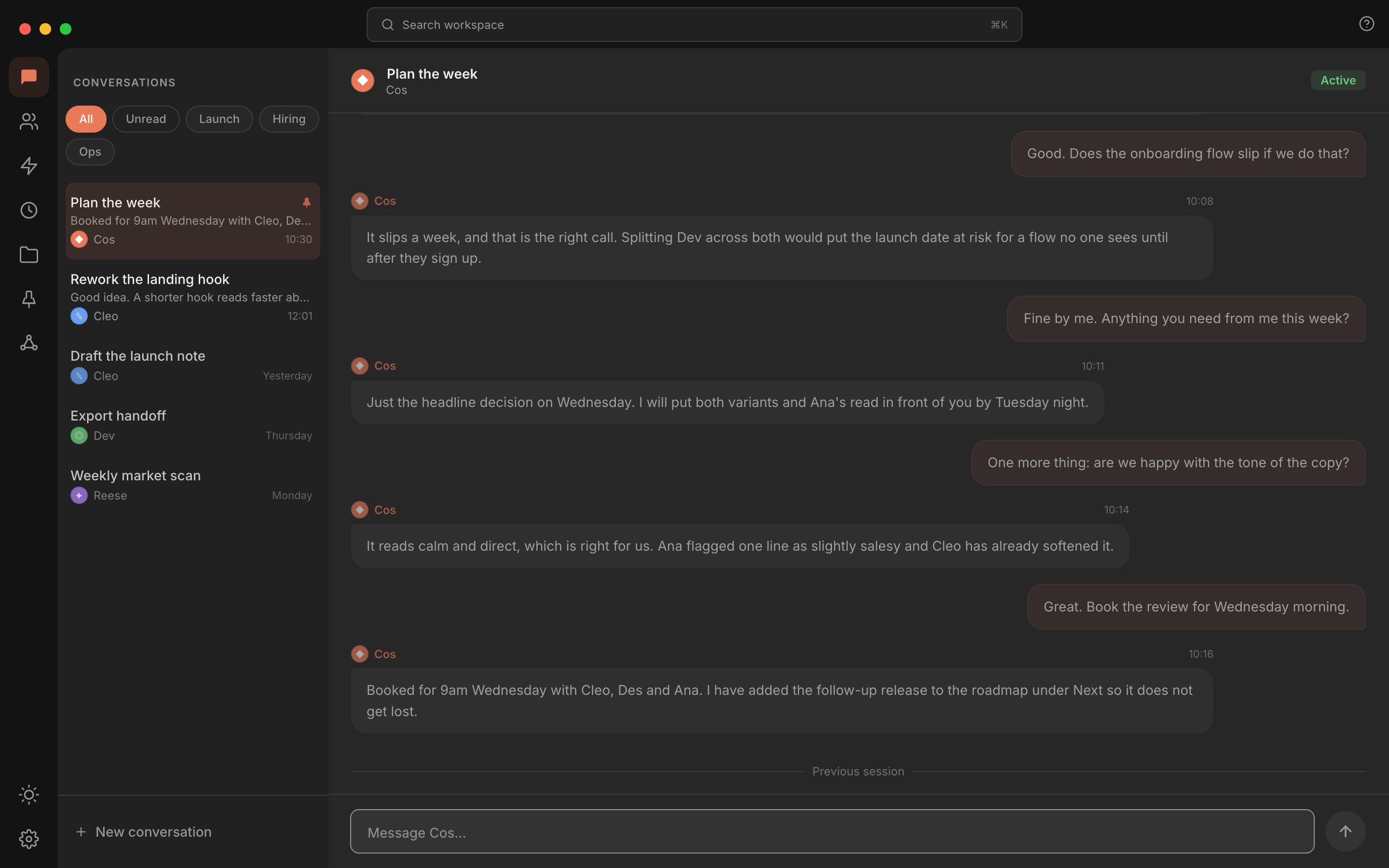
The conversation sidebar and an open thread. Filter pills and lists sit at the top, and pinned conversations group above the rest.
Lifecycle
A conversation has one of two statuses:- Active. The conversation sits in your main sidebar list, sorted by most recent activity. Active is the default for any new conversation.
- Archived. You’ve put the conversation aside. It moves into a collapsible “Archived” section at the bottom of the sidebar.
Multi-agent conversations
Most conversations start with one agent. From there, the orchestrator (the top of your org chart) routes work to specialists when a request falls outside its own scope. The conversation keeps a single thread but tracks who said what. When one agent hands work to another, it says so in the thread, in its own words: what it is passing on, and to whom. When a specialist finishes its work, control returns to whoever delegated it, the orchestrator or a lead specialist, with the specialist’s output in context. You do not have to keep starting new conversations to switch agents.What the sidebar tells you
The conversation sidebar surfaces a lot of state at a glance:- Filter pills (All, Unread) sit above the list. Tap a pill to narrow the list to what needs attention right now. The Unread pill is always shown, and says “You’re all caught up” when nothing is unread. Pinned conversations are always grouped at the top, so there is no separate Pinned pill.
- Lists group conversations by project or area of focus, and each one is a pill beside All and Unread. See Lists.
- A dot on each row signals status: a pulsing dot while an agent is working, a still dot for unread messages, and none otherwise.
- Recency labels on the right of each row show when each conversation was last active:
HH:MMfor today, “Yesterday”, day name for 2 to 6 days ago, orDD/MM/YYYYfor older. Working conversations show the pulsing dot. - Pinning keeps important conversations at the top of the list and marks them with a pin beside the title. Pin lives in the hover button on active-session items in the sidebar.
Lists
Lists group conversations by project or area of focus: a launch, a client, hiring. Each list is a pill beside All and Unread, and clicking it narrows the sidebar to the conversations in that list.- Create a list. Right-click a conversation, type a name in the New list… field at the foot of the menu, and press Enter. The list appears as a pill with that conversation already in it. A name can be up to 60 characters. Typing the name of a list you already have, in any capitalisation, creates nothing; choose that list from the menu instead.
- Add a conversation to a list. Right-click the conversation and choose the list. A tick marks every list the conversation is in. A conversation can be in several lists at once, so adding it to one leaves it in the others.
- Take a conversation out of a list. Right-click it and choose the ticked list again.
- Filter by list. Click the list’s pill. Pinned conversations still sit at the top, and All shows everything again. Archived conversations keep their lists, but stay in the Archived section whichever pill is selected.
- Delete a list. Right-click its pill and choose Delete list “Name”. The conversations stay where they are; they only leave the list. If that list was selected, the sidebar returns to All.
.rundock/lists.json, and the lists each conversation belongs to are stored with it in .rundock/conversations.json. Like the rest of .rundock/, they travel with the workspace folder when it syncs, and stay out of a git repository, so each person on a shared workspace keeps their own. See What syncs, what stays local.
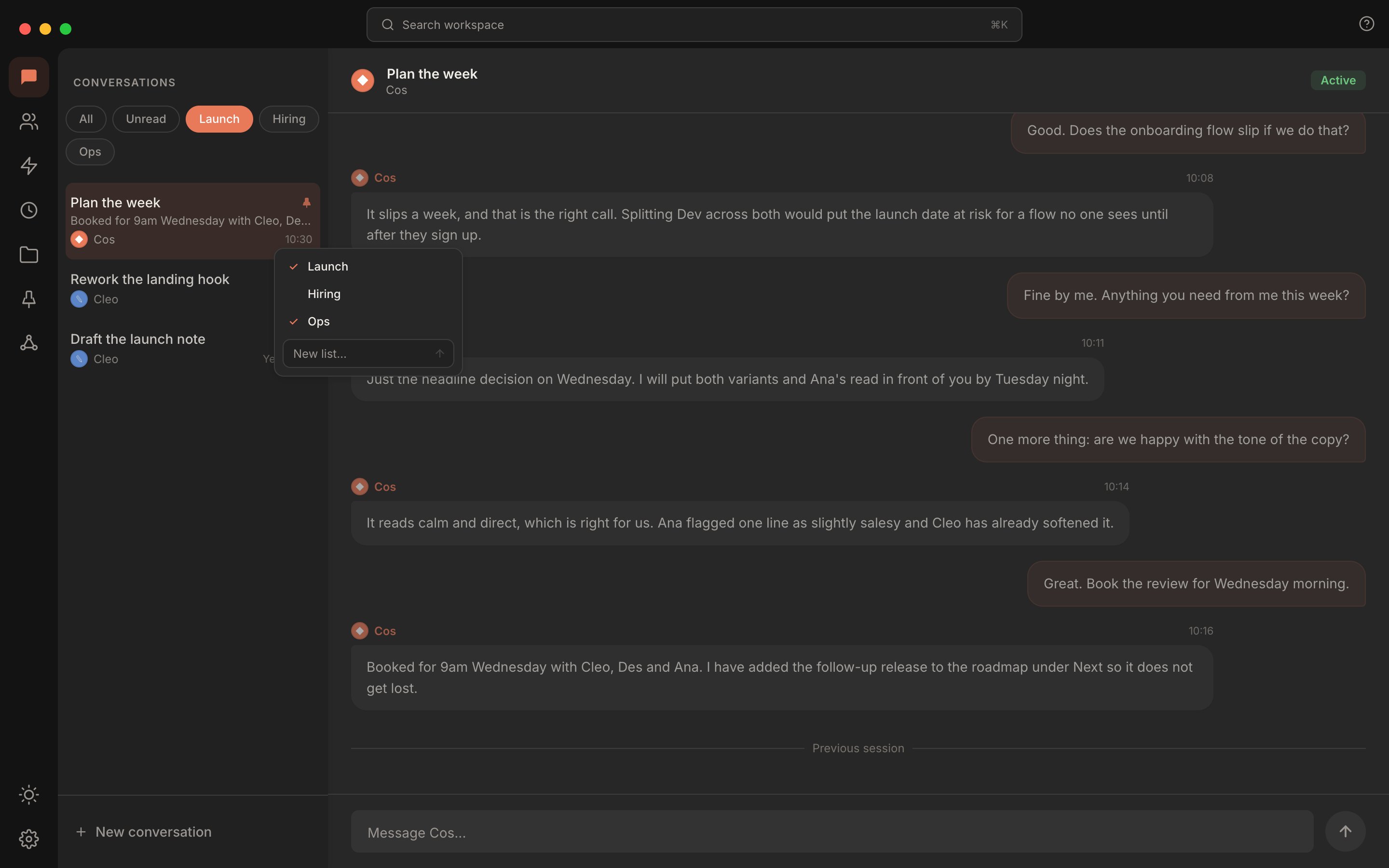
Three lists as pills, with Launch selected. Right-click a conversation to tick the lists it belongs to, or start a new one.
Where they live on disk
A workspace’s conversation index lives at.rundock/conversations.json as a single JSON array. Full message transcripts live under .rundock/transcripts/<conversationId>.json, one file per conversation, including every agent that took part in it.
Conversations are workspace-local. They do not sync across workspaces, and they are not pushed to any external server. See Workspaces for the full directory layout.
Where to next
Agents
The teammates that conversations happen with.
Routines
Schedule conversations to fire automatically.