

What an agent is
An agent file lives in your workspace at:.md extension is the agent’s slug. The slug is what other agents reference when they delegate, what Claude Code looks for when it spawns the agent, and what Rundock uses to draw the org chart.
Inside the file, the YAML frontmatter at the top declares the agent’s identity (name, role, where it sits on the org chart, the model it uses, an icon and colour). The body underneath is the agent’s instructions: who it is, what it does, what it does not do, and how it should communicate.
Two examples of what that looks like in practice:
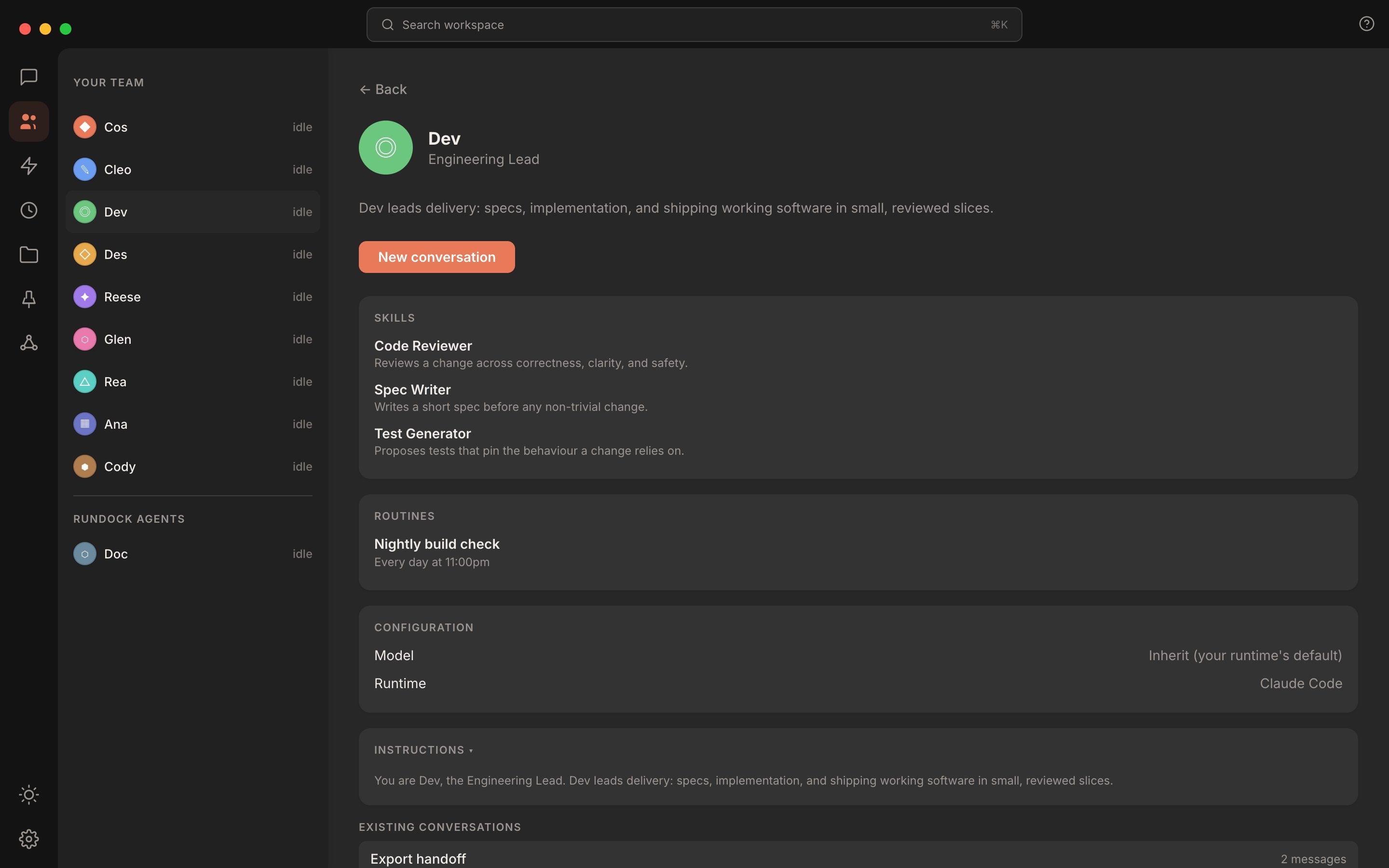
The same frontmatter, rendered as a profile in the Rundock UI. The markdown file is the source; the profile is the view.
Two types of agent
Rundock recognises two roles in the team. The orchestrator. One agent per workspace, sitting at the top of the org chart. The orchestrator receives most of your messages, reads the org chart, and decides which specialist to hand each piece of work to. Its job is to route, not to do the work itself. Specialists. Every other agent on the team. Each one owns a domain: content, research, ops, sales, design, engineering, or whatever shape your work takes. Specialists do the actual work and report back to the orchestrator (or to a lead specialist, if your team has sub-agents). There is also a third category, platform agents, which Rundock manages itself. The only one today is Doc, the built-in guide. You do not create platform agents and they sit below a divider in the team list, separate from your own team.Your team on the chart
Team shows your agents as an org chart, built from each file’sreportsTo and order. The orchestrator sits at the top, each level of reports below it, and Doc beneath a divider with the Rundock agents.
A deep team, or a tall window, reads better on its side. Switch layout, under the zoom controls, puts the orchestrator on the left and each level of reports in a column to its right. The same button switches back; its icon shows the layout you will get. Switching fits the whole team to the window again, and Rundock remembers your choice between sessions.
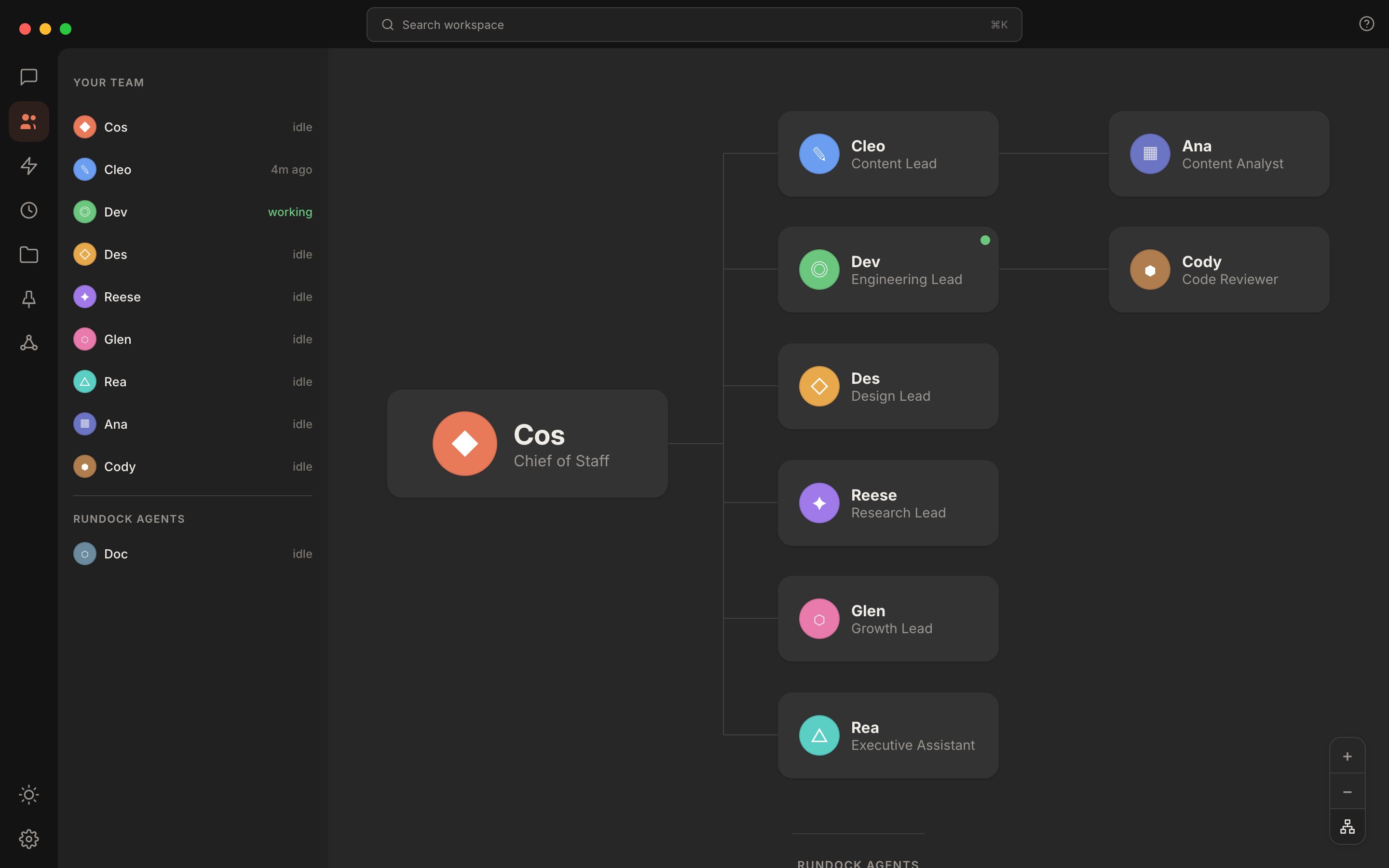
The same team laid out from left to right: the orchestrator on the left, each level of reports in its own column.
How delegation works
Delegation is the move that turns a chat into a team. Here is the shape of it. You send a message to the orchestrator: “draft a LinkedIn post on the launch and pull two supporting stats from the research.” The orchestrator reads its instructions. The instructions name the specialists on the team and describe what each one is for. Based on the request, the orchestrator decides this needs the Content Writer, and the Content Writer is going to need help from the Researcher. The orchestrator hands the work to the Content Writer with the relevant context. The Content Writer drafts the post, recognises it needs evidence, and delegates the research subtask to the Researcher. The Researcher returns findings. The Content Writer finishes the draft and hands it back up. You see all of this in the conversation panel. The delegation is visible: who asked who, what they passed, what came back. When you find a step that is going wrong, you can see exactly which agent to fix. The mechanism that makes this work is a delegation marker that Rundock injects at spawn time. You do not have to write it into your agent’s instructions, and you should not. The agent’s body says what to delegate and to whom (“if a request involves research, hand it to the Researcher”); Rundock provides the rest.Where work goes back
Work handed back goes to the agent that asked for it. In a team with a lead between the orchestrator and a specialist, as with the Content Writer and the Researcher above, that is the lead, not the orchestrator:- Finished. The lead takes the conversation back, with the specialist’s output in front of it, and waits for your next message.
- My part is done, more remains. The lead takes the conversation back and carries on, for example by handing the next step to another of its specialists.
- Out of scope. The request needs somebody outside the lead’s team, so it goes straight to the orchestrator, which routes it.
The instructions body
The instructions body is the most important part of an agent file. The frontmatter is a few short fields that define identity. The body is everything that defines behaviour. What good instructions look like:- The agent’s identity. “You are the Content Writer. You draft short-form written content for the user.”
- Scope. What the agent handles and what it does not. Clear in-scope examples and clear out-of-scope examples.
- Delegation rules. Which specialists this agent hands work to, and for what kind of request.
- Voice and style guidance. How the agent should sound. House rules. Things to avoid.
- Output format. Where the agent writes its work, what file paths it uses, what the deliverable looks like.
- Out-of-scope handling. What to do when a request falls outside the agent’s domain. The standard pattern is to say briefly that the request is outside scope and hand it back to the orchestrator.
Agents are portable
A Rundock agent file is a Claude Code agent file. The same markdown file works in three places:- Rundock on the desktop, with the org chart and the visual interface.
- Claude Code on the terminal, where the agent is spawned by slug.
- claude.ai on the web, where the agent format is also recognised.
Where to next
Agent file format
Every field in an agent file, with a complete worked example.
Create your first agent
A walkthrough of creating an agent from scratch.
Workspaces
How agent files relate to the rest of the workspace.
Skills
Reusable workflows agents can invoke.