

Skill vs agent instructions
The agent file defines the role. The skill file defines a specific capability within that role. An agent is a person. A skill is something that person knows how to do. A Content Writer agent has an identity, a voice, a scope, and a set of habits. Those go in the agent’s body. The same Content Writer might know how to run a “weekly LinkedIn audit”, how to “draft a launch announcement”, and how to “convert a transcript into a post”. Each of those is a procedure with steps, and each one belongs in a skill file. The split matters because:- Skills are reusable. A “weekly report” skill can attach to multiple agents. Putting it inside one agent’s body means copying it into every other agent that needs it.
- Skills keep agent files lean. A long, detailed workflow inside an agent’s body bloats the file and dilutes the agent’s identity. Lifting it into a skill keeps the agent body focused on role and voice.
- Skills are visible to the model. Claude Code offers the model each skill’s name and description when it decides whether to use one, and Rundock tells an agent that leads a team which skills each of its members owns. A capability buried in an agent’s body appears in neither list.
When to make a skill
Make a skill when:- The same procedure applies to multiple agents.
- The procedure is long enough or detailed enough that putting it in the agent’s body would bloat it.
- The procedure has clear steps you want the agent to follow consistently.
- The behaviour is specific to one agent and unlikely to be reused.
- The instruction is a single sentence or two of guidance, not a multi-step process.
- The behaviour is part of the agent’s identity rather than a discrete capability.
Where skills live
A skill is a folder, not a flat file. The folder name is the skill’s slug.SKILL.md file inside the folder is the skill definition. The folder shape exists so a skill can keep references, templates, sub-files, and assets next to its definition without polluting the skills root.
How skills attach to agents
Rundock matches skills to agents in two passes. Two rules apply to both. Only agents on the team are considered: an agent with noorder gets no skills, however it declares them. And the rundock- prefix gates both ways: Doc and other platform agents get only rundock- skills, and every other agent gets everything except them.
Pass 1: explicit assignment via the agent’s skills: array. The agent’s frontmatter declares which skills it owns. Each entry is a skill slug:
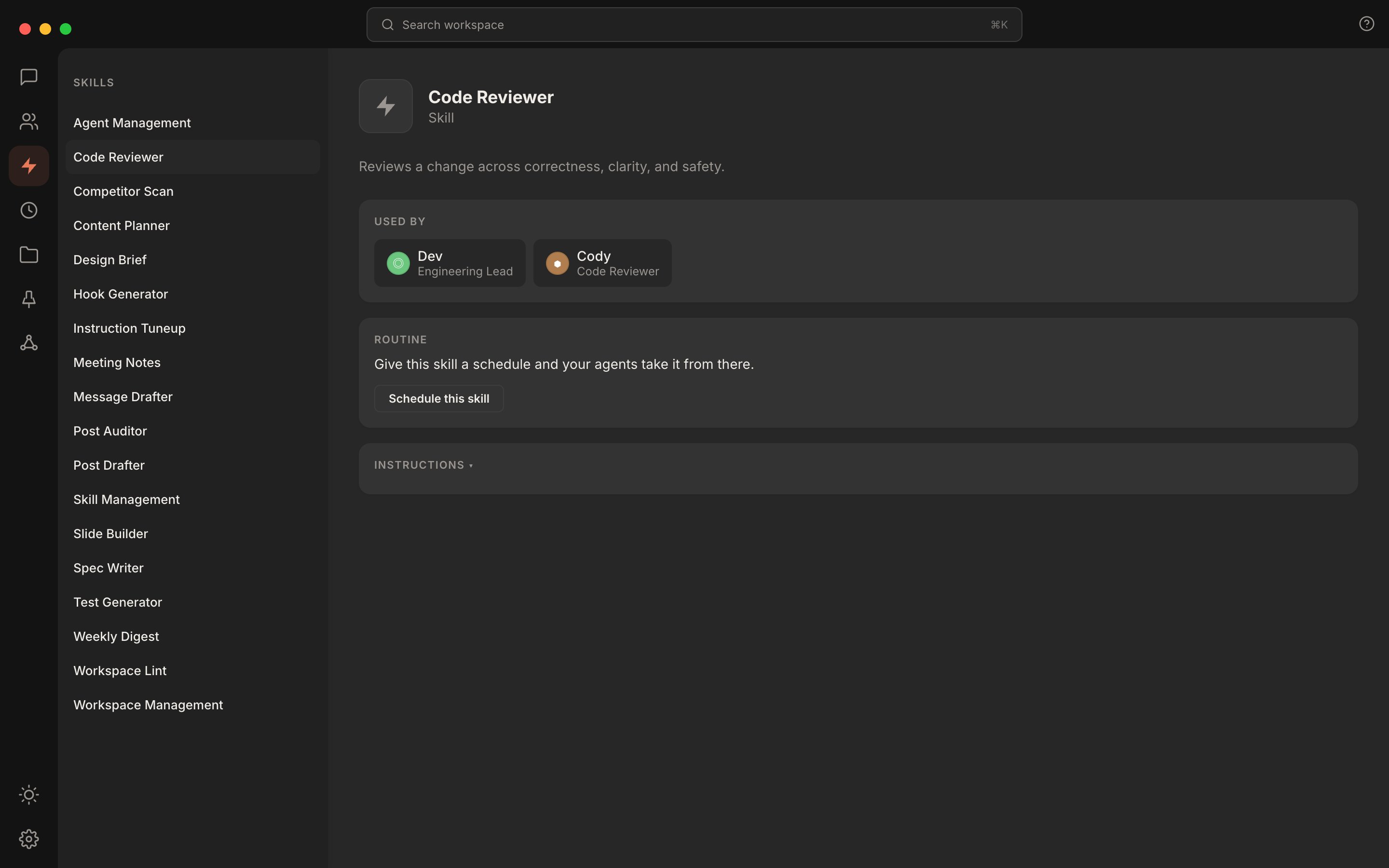
The skills panel shows what each skill is and which agents own it. The Used By row makes assignment visible without opening any agent file.
git-workflow; Quill owns draft-post). Let body-text fallback handle weaker references.
A skill can be assigned to multiple agents. The skill’s profile shows a “Used by” row listing every agent it is attached to.
What goes in a skill body
Skills are leaf instructions, not standalone personalities. The body is written for the agent that will run it, in the second person. A typical skill body has:- A clear “Use this skill when…” opener so the agent has unambiguous entry criteria.
- The inputs the skill expects.
- Numbered, imperative steps.
- An output format the agent should produce.
- Edge cases.
- Boundaries: explicit statements of what the skill does NOT do.
How a skill gets chosen
Two layers are involved, and they see different things.- Rundock tells each agent that leads a team which skills its members own, by slug only: a bare list such as
Skills: alpha, beta, with no description. That is how an orchestrator knows which agent to hand a request to. - Claude Code, the runtime agents run in by default, discovers the skills in
.claude/skills/and offers the model each skill’s name and description. That is what the model reads when it decides whether to use a skill. The body loads only once it does.
linkedin-hook-generator rather than content-helper, and write the description as the trigger: what the skill does and when to use it. Put the key use case first, because Claude Code truncates long descriptions in its listing.
Good: “Scan recent work surfaces for repeated manual patterns and propose new skills to build, ranked by leverage. Use when reviewing the week or deciding what to automate next.”
Less good: “Helps you find things to automate.”
The first tells the model what the skill does and when it applies. The second is a tagline.
Where to next
Write a skill
A walkthrough of creating a skill and assigning it to an agent.
Skill file format
Every field, with a complete worked example.