

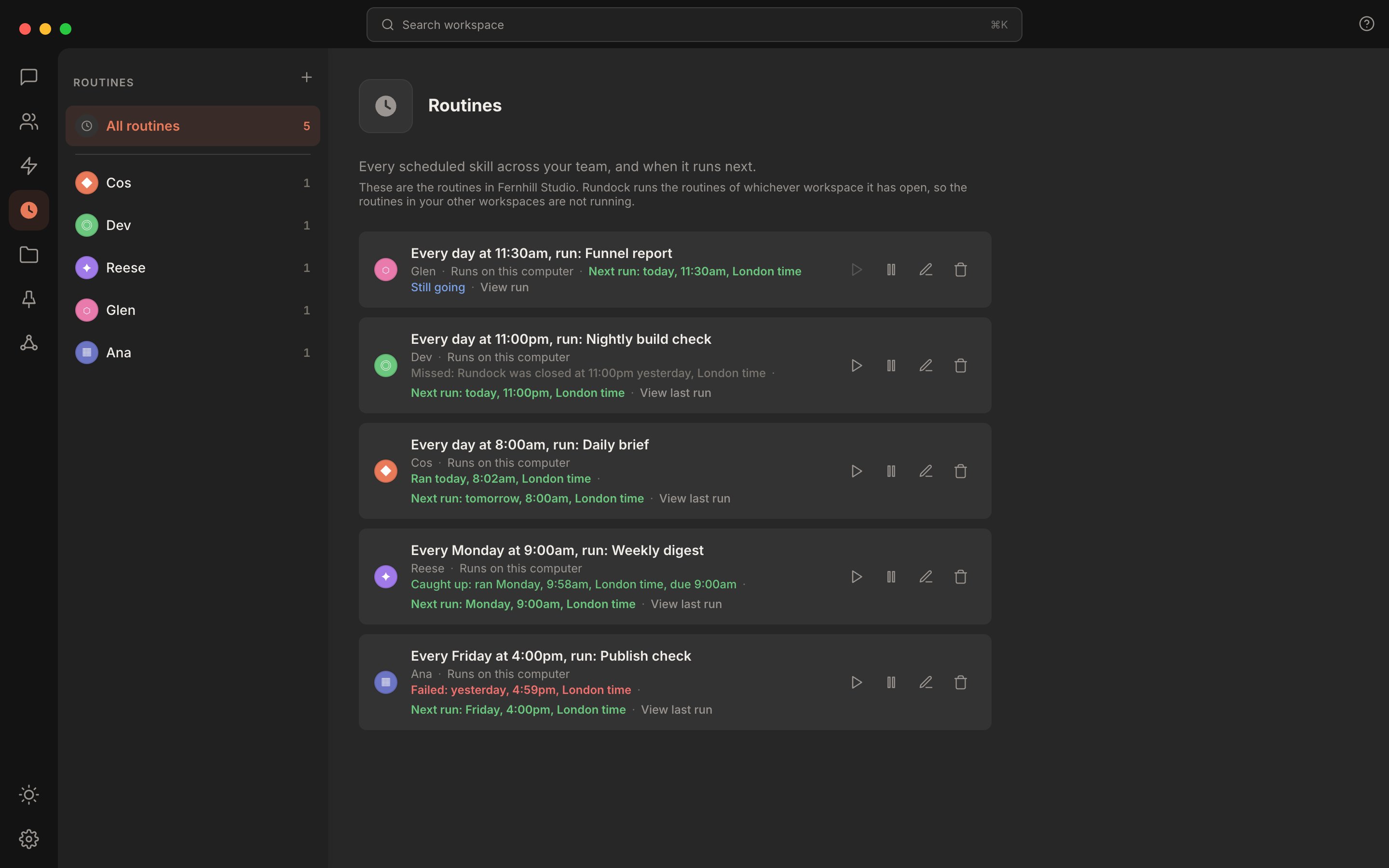
Routines in different run states, each with Run now on its row.
Add a routine
The normal way in is the Add routine form, reached from an agent’s page or from Routines in the rail. It is two short steps:- Pick a skill. Every routine schedules one of the agent’s existing skills. There is no freeform prompt field: the instruction is derived from the skill you pick, so what fires is always something the agent already knows how to do.
- Say when. Choose a frequency (daily, or a specific weekday) and a time, in one plain sentence: “Run Weekly research digest every Friday at 4:00am, on this computer.” Confirm, and the routine is live.
routines: entry in the agent’s frontmatter. A routine made in the form and one written by hand are the same routine; the form is just the fast, correct path through the format documented in Routine format.
An existing routine’s schedule can be changed the same way, without deleting and recreating it: open the routine and pick a new time.
For a full walkthrough with screenshots, see Set up a routine.
What a routine looks like once it’s running
Routines in the rail shows every routine across every agent in the workspace, one list, with a sidebar that narrows it to one agent’s routines. Once a routine has run at least once, its row shows what happened last time, in one of five tones:- Ran: the routine fired on schedule and finished. Shown in the success colour.
- Caught up: Rundock was closed at the scheduled time and the routine fired once you opened it again. Also a success, just a quieter one: the row names both the time it actually ran and the time it was due, so the delay reads as legible rather than alarming.
- Missed: a scheduled slot went by with Rundock closed, and it fell outside the same-day catch-up window. This is history, not an error: the row names the cause (Rundock was closed) rather than treating it as a failure.
- Stopped: you stopped the run. History rather than a failure, shown in the same quiet tone as Missed.
- Failed: the run actually failed. This is the only one of the five that gets an alarming colour, on purpose: a routine that ran late or was missed while your laptop was shut is the ordinary case for most setups, and dressing that up as a warning teaches you to ignore the one signal that matters.
See what a run did
Every run leaves a record: the files it changed, when it started, how long it took, and how it ended. Reach it from a “View run” link on a routine still going, or “View last run” once it has finished. The run screen shows one of six outcomes, each in its own words so they cannot be mistaken for one another:- Finished: the run got to the end and did what it was asked to.
- Stopped early: the run started and did not get through what it was asked to (a real failure).
- Reported failed: the run ended cleanly, but the agent said it could not do its job, with
RUN STATUS: failed: <reason>(see below). - Stopped: you asked the run to stop, and it ended. Deliberately not read as a failure: this ending was witnessed, it just was not the one the routine was working towards.
- No ending recorded: Rundock closed while the run was under way, so nothing recorded how it turned out. Also not read as a failure: it may have finished a moment before Rundock closed, and nothing here claims otherwise.
- Still going: self-explanatory, and the one state that offers the Stop control described below.
Stop a run in progress
A run’s own screen carries a Stop control whenever it is still going, including in the brief window before its process has actually started. Pressing it shows “Stopping…” immediately; the run ends in its own time; its record then reads Stopped, with a real duration, since the ending was witnessed. Stopping a run does not cancel the routine. It runs again at its next scheduled slot, same as any other routine, just not again in the period you stopped it.Run a routine now
Every row on the Routines list has a Run now control that runs the routine once, straight away, while you watch. It takes the same path a scheduled run does, and leaves the same record, marked as started manually. It works on any routine, including one that is paused, not yet turned on, or waiting for approval, which is how you try a routine before you approve it. A manual run moves no schedule: the next scheduled run stays exactly where it was. The control is disabled while a run of that routine is going.Approving a changed routine
A routine you make in the form is approved from the moment you save it. Changing what it runs, its prompt, its skill or where it runs, lapses that approval: the routine pauses, its row takes the attention colour and says what it runs has changed, and Review and resume approves it as it now stands. A routine a package brought in waits the same way for your approval before its first run. Changing only when a routine runs, or pausing it, leaves the approval standing. A pause you set yourself looks different on purpose: the row dims, reads Paused, and Resume brings it back.What routines are good for
Three patterns that work well in practice. Morning briefing on the orchestrator. Fires at 5am, runs whatever the orchestrator’s body defines as “session start”. Writes the briefing to the day’s note so the user sees it when they open the workspace. End-of-day sync on the executive assistant. Fires at 9pm, pulls the day’s meetings from a meeting tool, writes meeting notes, creates action items through a tasks connector, updates the people graph. Weekly research digest on a research-focused agent. Fires once a week before the user is awake. Runs a long pipeline (LinkedIn analysis, competitor scan, trending research) and writes a digest to a known folder. The shape that ties these together: the routine is doing context-heavy work outside working hours, so it does not consume tokens during interactive sessions. By the time the day starts, the work is on the user’s desk.How the scheduler behaves
The scheduler ticks every 60 seconds. On each tick, Rundock checks every routine on every agent and fires any whose schedule has come due. Each routine has alastRun guard so daily routines do not re-fire the same calendar day, and weekly routines do not re-fire on the same weekday they last ran on. The guard is held in memory and saved to .rundock/routine-state.json after every run, so it survives a restart.
When a routine fires, it runs on its agent’s runtime. For a Claude Code agent, Rundock spawns a headless Claude Code subprocess with the routine’s prompt as the input message, running with skipped permissions because there is no user available to approve tool calls in real time. A routine on a Codex agent runs as a turn on the Codex CLI.
If the routine’s agent does raise a permission card, it appears in the approvals dock, over whatever screen you have open, naming the routine and the agent. It never lands in a conversation, and a card nobody answers is denied at the usual timeout. See Routine format for the detail.
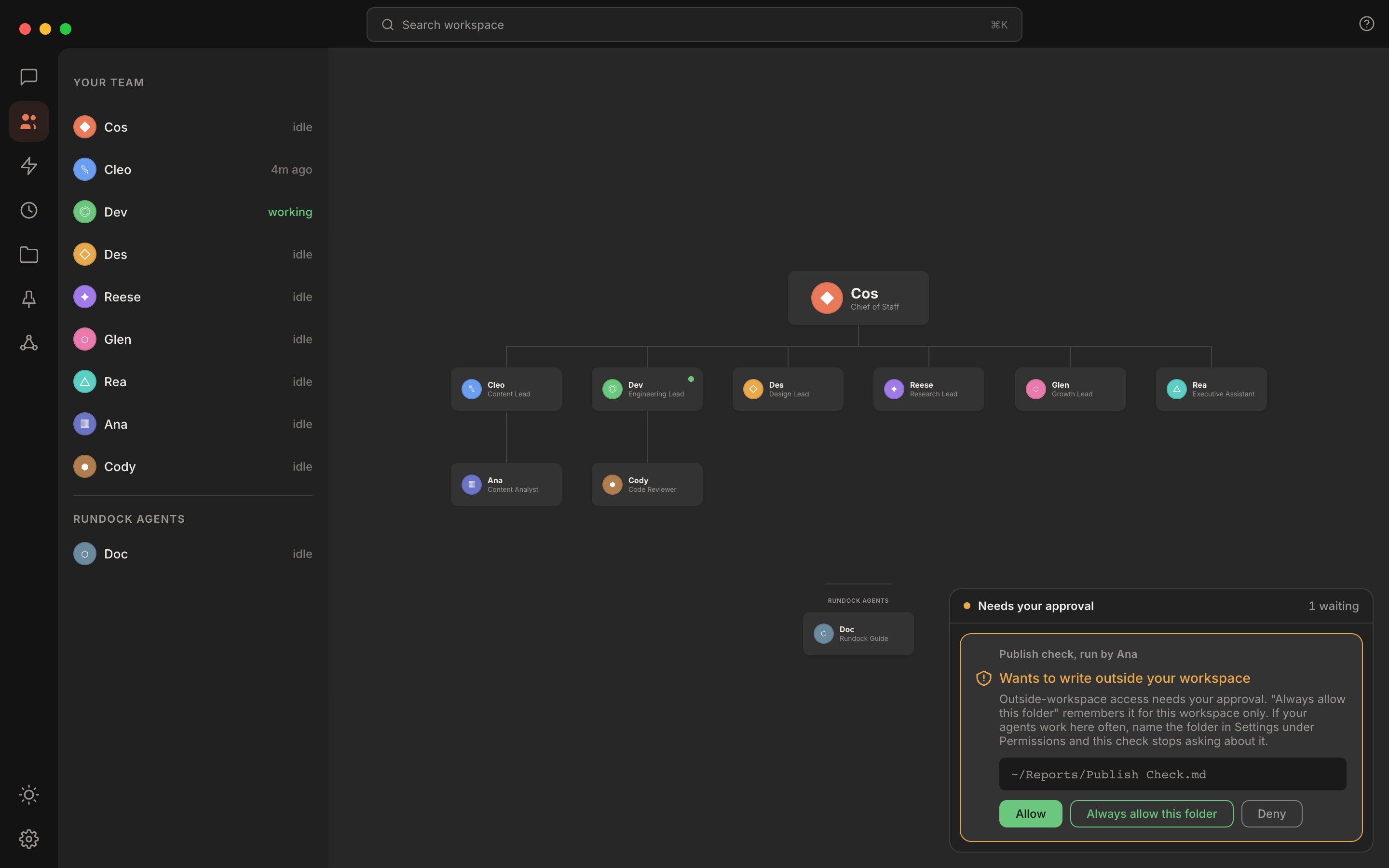
A routine's permission card waits in the approvals dock, named for the routine and its agent.
RUN STATUS: failed: <reason>, the run is recorded as failed with that reason. See Declaring that a run failed.
Limits worth knowing
Be honest before getting attached to routines.No notification when a routine completes. You notice a routine ran by either seeing the row update in the Routines list, or seeing the file the agent wrote, or seeing the tasks the agent created.
Schedule format is exact, and a schedule it cannot read never fires. Cron expressions are not supported. Times must be two-digit zero-padded. Weekdays must be the full word. A routine with an unrecognised schedule never fires; its row says Rundock cannot read the schedule, names the two forms that work, and shows no next run. If a routine appears to do nothing, the schedule string is the first thing to check. See Routine format for the full pattern reference.
Always-on routines
If you want routines to fire while you are away from your computer, two practical paths. Run Rundock on a small VPS. Keep Rundock running on a cloud server (Hetzner, DigitalOcean, Hostinger, etc) and reach it from any device through a browser. The scheduler ticks 24/7, routines fire on cadence regardless of whether your laptop is open. Costs around £5 to £10 per month plus a couple of hours of initial setup. The trade-off is real but small. Use Anthropic’s managed Claude Code Routines. Anthropic shipped a managed scheduling layer that fires Claude Code sessions on their cloud infrastructure. Available on Pro, Max, Team, and Enterprise plans with Claude Code on the web enabled. The minimum recurring interval is one hour. See the official docs for the full feature set. Anthropic’s Routines and Rundock’s routines are complementary, not interchangeable. Rundock routines run inside your local agent team with full read and write access to the workspace. Anthropic’s Routines run inside a Claude Code cloud environment with access to whatever you wire into it (primarily GitHub repositories and remote connectors). They do not see your local vault or your Rundock agent definitions. The split that tends to work in practice: keep workspace-bound routines (morning briefings, end-of-day syncs, anything that depends on local files) on Rundock and host Rundock on a VPS if you need 24/7 firing. Move repo-bound work (PR triage, scheduled code review, release notes) to Anthropic’s Routines.Where to next
Set up a routine
A walkthrough of adding a routine through the form and confirming it fires.
Routine format
The underlying frontmatter format, for power users and scripting.