> ## Documentation Index
> Fetch the complete documentation index at: https://docs.rundock.ai/llms.txt
> Use this file to discover all available pages before exploring further.
# Skills
> What a skill is, when to use one instead of agent instructions, and how skills attach to agents.
A skill in Rundock is a reusable instruction document. A research workflow, a writing process, an audit checklist, a sales prep sequence: each one belongs in a skill file so the same instructions can attach to one or more agents without being duplicated in every agent's body.
## Skill vs agent instructions
The agent file defines the role. The skill file defines a specific capability within that role.
An agent is a person. A skill is something that person knows how to do.
A Content Writer agent has an identity, a voice, a scope, and a set of habits. Those go in the agent's body. The same Content Writer might know how to run a "weekly LinkedIn audit", how to "draft a launch announcement", and how to "convert a transcript into a post". Each of those is a procedure with steps, and each one belongs in a skill file.
The split matters because:
* **Skills are reusable.** A "weekly report" skill can attach to multiple agents. Putting it inside one agent's body means copying it into every other agent that needs it.
* **Skills keep agent files lean.** A long, detailed workflow inside an agent's body bloats the file and dilutes the agent's identity. Lifting it into a skill keeps the agent body focused on role and voice.
* **Skills are visible to the orchestrator.** The orchestrator reads each skill's `description` field when routing work. A capability hidden inside an agent's body is invisible to routing.
## When to make a skill
Make a skill when:
* The same procedure applies to multiple agents.
* The procedure is long enough or detailed enough that putting it in the agent's body would bloat it.
* The procedure has clear steps you want the agent to follow consistently.
Keep it in the agent's instructions when:
* The behaviour is specific to one agent and unlikely to be reused.
* The instruction is a single sentence or two of guidance, not a multi-step process.
* The behaviour is part of the agent's identity rather than a discrete capability.
A simple test: if you can imagine writing "use the X skill" inside an agent's instructions, X is a skill. If you would only ever write the instruction inside the agent's body, it is not.
## Where skills live
A skill is a folder, not a flat file. The folder name is the skill's slug.
```
your-workspace/
.claude/
skills/
weekly-report/
SKILL.md # the skill definition
references/ # optional: examples, templates, sub-routines
```
The `SKILL.md` file inside the folder is the skill definition. The folder shape exists so a skill can keep references, templates, sub-files, and assets next to its definition without polluting the skills root.
Flat skill files at `.claude/skills/my-skill.md` are not discovered. Rundock only walks subdirectories of `.claude/skills/` looking for `SKILL.md`. The skill must live at `.claude/skills//SKILL.md` to be picked up.
## How skills attach to agents
Rundock matches skills to agents in two passes.
**Pass 1: explicit assignment via the agent's `skills:` array.** The agent's frontmatter declares which skills it owns. Each entry is a skill slug:
```yaml theme={null}
skills:
- linkedin-hook-generator
- voice-editor
- readwise-highlights
```
This pass takes precedence. An agent matched in Pass 1 is not considered again in Pass 2 for the same skill.
**Pass 2: implicit assignment via body-text scan.** For every agent not matched in Pass 1, Rundock reads the agent's body and tests whether the skill's slug appears as a distinct word-boundary token. Mentioning a skill slug in prose attaches the skill. Mentioning it as part of a larger token does not.
 Use explicit assignment when the relationship is permanent and load-bearing (Dev owns `git-workflow`; Penn owns `linkedin-hook-generator`). Let body-text fallback handle weaker references.
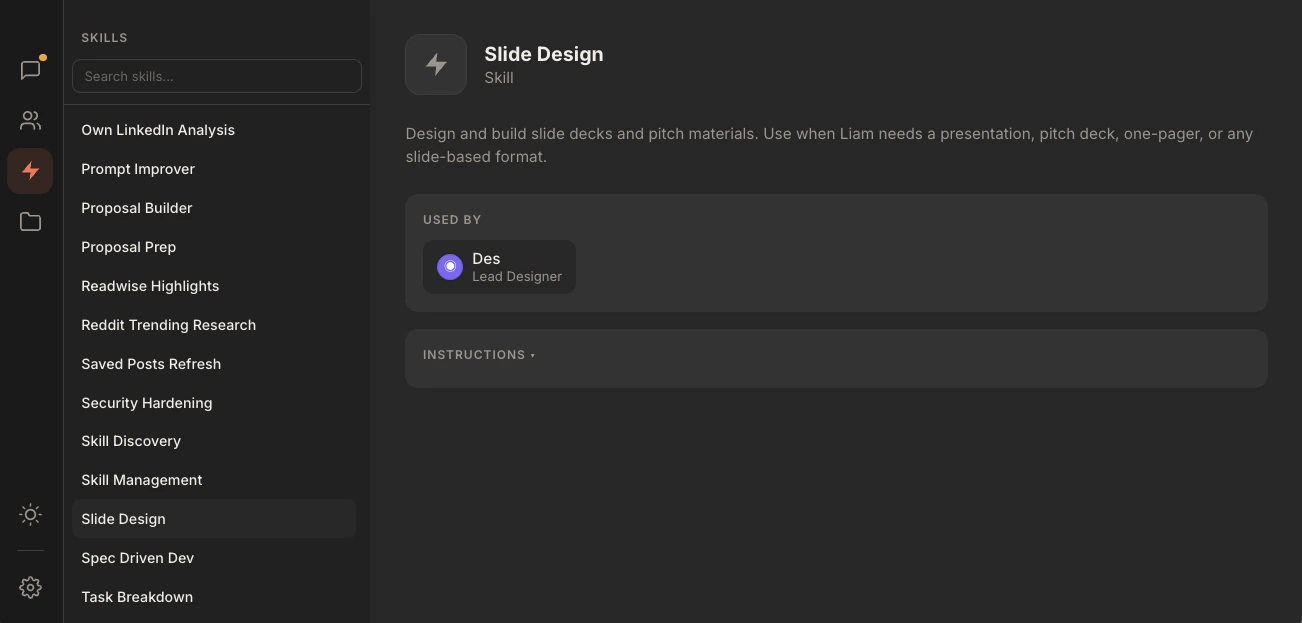
A skill can be assigned to multiple agents. The skill's profile shows a "Used by" row listing every agent it is attached to.
## What goes in a skill body
Skills are leaf instructions, not standalone personalities. The body is written for the agent that will run it, in the second person.
A typical skill body has:
* A clear "Use this skill when..." opener so the agent has unambiguous entry criteria.
* The inputs the skill expects.
* Numbered, imperative steps.
* An output format the agent should produce.
* Edge cases.
* Boundaries: explicit statements of what the skill does NOT do.
Length discipline. Live skills cluster around 100 to 200 lines of body text. If a skill is growing past 300 lines, it is doing too much. Split it, or move bulk into reference files in a sibling folder and link to them from the body.
The full field reference is on the [skill file format](/reference/skill-file-format) page.
## A note on routing
The orchestrator reads each skill's `description` field when deciding whether to route work to an agent that owns it. A skill with no description is invisible to routing.
This means the description is a routing signal, not a tagline. Write it as: a verb, a clear capability, and the trigger phrase the user is likely to type.
Good: "Scan recent work surfaces for repeated manual patterns and propose new skills to build, ranked by leverage."
Less good: "Helps you find things to automate."
The first one tells the orchestrator exactly when to route a request to the agent that owns this skill. The second is a tagline.
## Where to next
A walkthrough of creating a skill and assigning it to an agent.
Every field, with a complete worked example.
Use explicit assignment when the relationship is permanent and load-bearing (Dev owns `git-workflow`; Penn owns `linkedin-hook-generator`). Let body-text fallback handle weaker references.
A skill can be assigned to multiple agents. The skill's profile shows a "Used by" row listing every agent it is attached to.
## What goes in a skill body
Skills are leaf instructions, not standalone personalities. The body is written for the agent that will run it, in the second person.
A typical skill body has:
* A clear "Use this skill when..." opener so the agent has unambiguous entry criteria.
* The inputs the skill expects.
* Numbered, imperative steps.
* An output format the agent should produce.
* Edge cases.
* Boundaries: explicit statements of what the skill does NOT do.
Length discipline. Live skills cluster around 100 to 200 lines of body text. If a skill is growing past 300 lines, it is doing too much. Split it, or move bulk into reference files in a sibling folder and link to them from the body.
The full field reference is on the [skill file format](/reference/skill-file-format) page.
## A note on routing
The orchestrator reads each skill's `description` field when deciding whether to route work to an agent that owns it. A skill with no description is invisible to routing.
This means the description is a routing signal, not a tagline. Write it as: a verb, a clear capability, and the trigger phrase the user is likely to type.
Good: "Scan recent work surfaces for repeated manual patterns and propose new skills to build, ranked by leverage."
Less good: "Helps you find things to automate."
The first one tells the orchestrator exactly when to route a request to the agent that owns this skill. The second is a tagline.
## Where to next
A walkthrough of creating a skill and assigning it to an agent.
Every field, with a complete worked example.